OXVA Verify: how to check if your OXVA is original
OXVA (Xlim, Origin and more) uses a 14-character security code under a scratch coating, and newer V2 labels add a QR code. Check the label look first, then scratch, scan or enter the code on the official OXVA verify page. OXVA warns when a code has been queried many times.
- 14-character code
- QR scan
- Official site: oxva.com
OXVA authenticity check
Open official OXVA verify page ↗Where is the security code on a OXVA?
The OXVA authentication label is on the box. V2 labels have a laser-silver solid background with no colour-shifting effect, a 3D embossed logo, a scratch code and a QR. V1 labels have a directional patterned texture with a metallic 3D effect and a scratch code only.
How to verify a OXVA – step by step
- 1
Inspect the label
V2: laser-silver solid background, no colour shift, 3D embossed logo with a metallic relief. V1: directional patterned texture with a metallic 3D effect from every angle.
- 2
Scratch off the coating
Reveal the 14-character security code.
- 3
Scan the QR (V2 labels)
If your label has a QR code, scan it with your phone camera.
- 4
Or enter the code
Type the code here – we copy it and open oxva.com/pages/verify.
- 5
Check the result
Only results on www.oxva.com are official. If OXVA says the code has been verified many times, it may be fake – contact OXVA about the purchase channel.
OXVA verification: video & visual guide
OXVA shows the check in two official videos – one for devices and one for cartridges. Below them you can see how the two genuine label versions (V2 and V1) look before and after scratching.
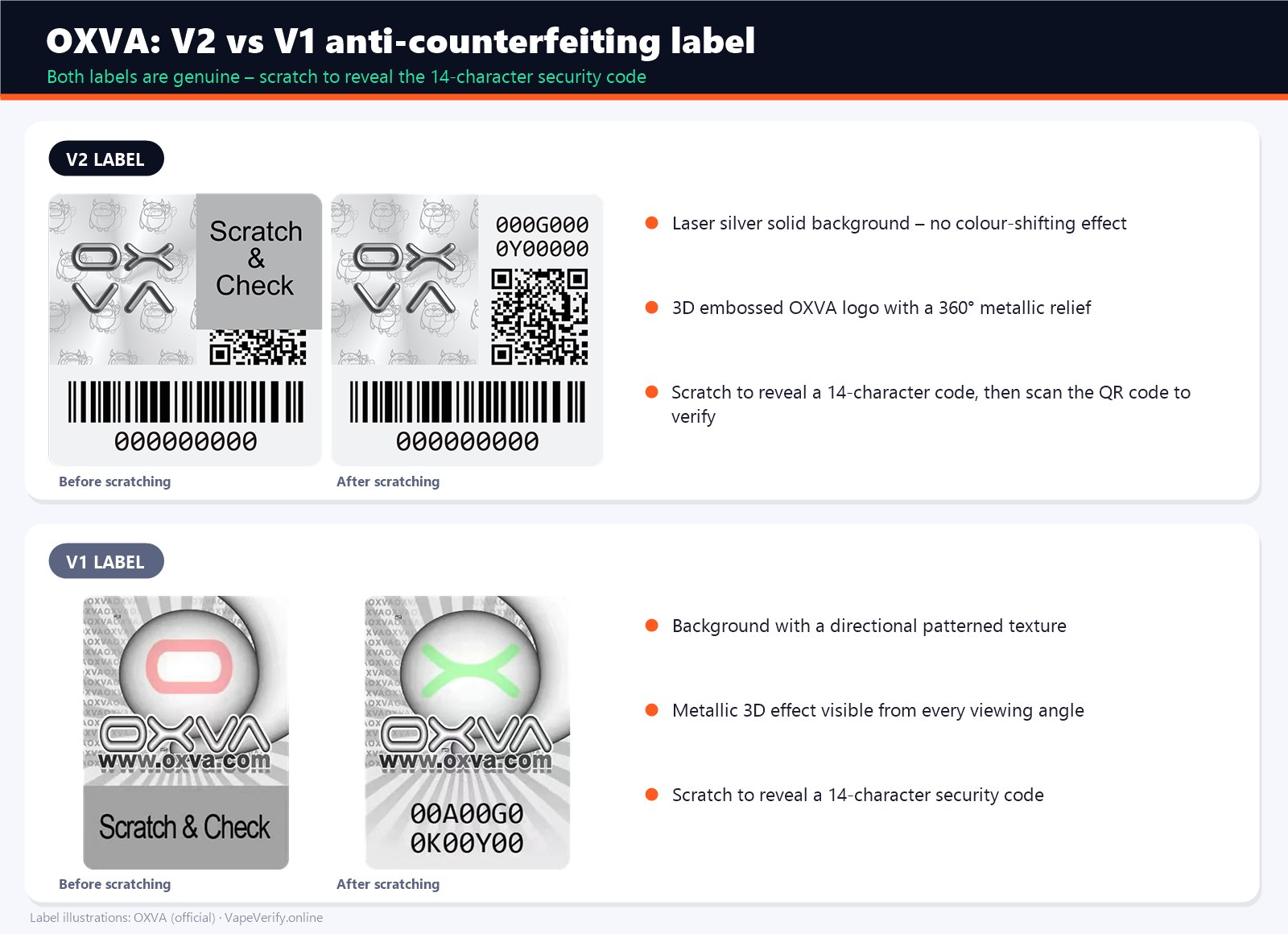
OXVA asks you to verify only on its official website. Bought your device from a cheap social media ad? Read our guide to scam vape shops.
What your OXVA verification result means
Genuine / verified
The code exists in the OXVA database and is checked for the first time. Your product is original.
Already checked
The code is real but was queried before. Fine if you checked it yourself – suspicious on a sealed new device.
Not found / invalid
Re-type the code carefully. If it still fails, the product is very likely counterfeit.
OXVA authenticity tips
- V1 labels without QR are genuine – just enter the code manually.
- Make sure all 14 characters are entered.
- OXVA cartridges can be verified the same way.
- Buy from authorised retailers and keep your receipt.
- Compare the device with photos on oxva.com: logo, colours, fonts and flavour names should match exactly.
OXVA verify FAQ
How do I verify a OXVA vape?
Scratch off the coating on the OXVA authentication label, then enter the 14-character security code or scan the QR code on the official oxva.com verification page. Use the verify box on this page for a one-click check.
Where is the security code on a OXVA?
The OXVA authentication label is on the box. V2 labels have a laser-silver solid background with no colour-shifting effect, a 3D embossed logo, a scratch code and a QR. V1 labels have a directional patterned texture with a metallic 3D effect and a scratch code only.
What is the official OXVA verification website?
The official OXVA checker is on oxva.com. Results shown on any other domain should not be trusted.
What if my OXVA code is not found or already checked?
Check that you typed every character correctly. If the code is still unknown, or a sealed device shows previous checks, the product may be counterfeit – stop using it and contact the seller and OXVA support.
VapeVerify is not affiliated with OXVA. The OXVA name and logo belong to their owner and are shown only to identify the product. Verification results are provided by oxva.com.